// guide · exploring
// standing orders
This page shows you how to hand your rovers, barges, traders and deep-space probes over to the crew, so that a vehicle that comes home goes straight out again by itself, even at night, and how to see what the crew sent.
Standing orders open at Level 16, with the Autonomy research. Until then, every vehicle goes where you send it.
// research autonomy
where to find it · [ research ] → autonomy
Autonomy has four levels, and each one brings the orders for one more kind of vehicle, in this order: rovers, barges, traders and deep-space probes. Its card names the kind its next level brings, as in ↑ lvl 0 → 1 with standing orders for the rovers. Once level 4 is researched, the card is gone.
Each level costs more and takes longer than the one before, and each counts toward your level conditions like any levelled research. Research belongs to you, so each level brings its orders to every colony you hold.
// switch an order on
Each kind's order is one line in the section where you send that kind by hand, under the vehicles: // surface for the rovers, // orbit for the barges, // trade for the traders and // system for the deep-space probes. The line appears once Autonomy reaches the kind's level and the colony holds a vehicle of it, or a trading post for the traders.
- Open
[ explore ]and find the order's line, which starts withautoand says what the order does. - Press
[ auto: off ]at the end of the line. The switch changes to[ auto: on ]. - Every vehicle of that kind that is at home goes out at once, and each one after that goes out the minute it comes home.

Every order starts off, in every colony, and nothing switches one on for you. Each colony keeps its own switches.
// what each order does
An order sends only a vehicle that is at home, and always on the plain choice, by a fixed rule:
- Rovers explore the regions still unexplored, lowest numeral first. Once every region is explored, they dig deep where the rovers have dug least.
- Barges mine the richest asteroid, comet or captured rock in range that no barge has mined, a relic first, then the biggest haul.
- Traders sell from a store that is at least 90% full, for the resource whose store is emptiest, and only at a rate of 100% or better on the waystation's board.
- Deep-space probes chart the nearest world still uncharted, the home system first.
If a barge is at home with nothing in range, it waits for another rock. If a trader shows waiting, it stays at home until a trade meets the rule.

The runs are the ones you would send yourself: the same trips, finds, relics, notes and curios, and the same research and relics shortening them. An outing, a trip and a charting cost nothing, and a trader's run pays its lot as it leaves.
// what an order leaves to you
An order never recalls or redirects a vehicle, and never touches one you sent by hand. While it is on, you can still send any vehicle that is home yourself.
Some choices stay yours alone. An order never nudges a stray rock, sends a barge to something a lead found, follows a lead or makes a choice in one, trades with a visiting freighter, sends freight to another colony or spends an artefact. Those buttons keep their ◆, while the sends an order makes for you no longer count toward it.
// see what the crew sent
A vehicle out on an order shows auto after its name. Its line in // now starts with ↻.
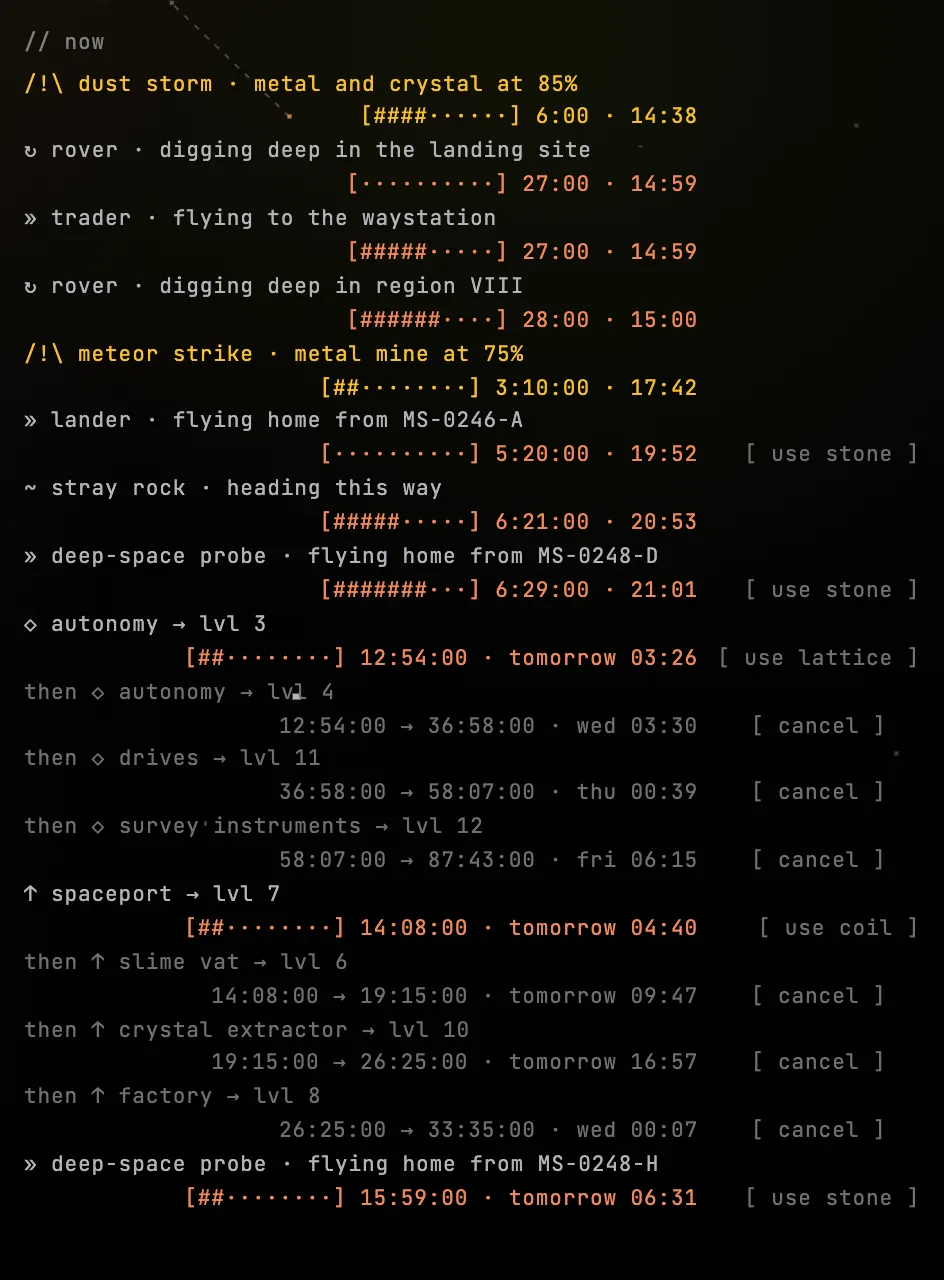
Each return it brings home is an entry of its own in the log, starting with ↻. When you come back after a while, the while-you-were-away card adds up the returns that only brought cargo into one line for each kind, with how many came home and what they brought. A return with a find, a relic or a curio keeps a line of its own.
// switch an order off
Press [ auto: on ]. Every vehicle the order already sent finishes its run and waits at home.
// more than one colony
The rovers', barges' and traders' orders work in every colony you hold from the minute Autonomy reaches their level, whatever that colony's own level. The deep-space probes are the home colony's, so their order is only there.
A colony with any order switched on is never waiting, so it never writes that it is: see Emails and notifications.